
Raw Export
RawExport is a fast, lightweight Windows desktop application for batch-converting camera RAW files and common image formats to JPEG or PNG.
Built for photographers who need a straightforward tool without the overhead of a full editing suite.
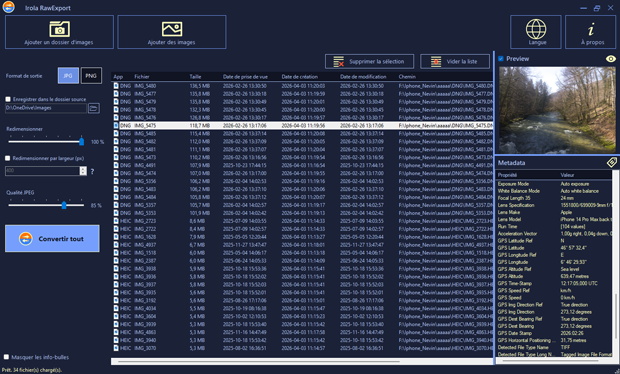
Features
Wide Format Support
Add as many folders as you like, with or without subfolders.
Supports all major camera RAW formats as well as standard image types:
RAW Formats: DNG, CR2, CR3, NEF, ARW, ORF, RW2, RAF, PEF, SRW
Supports all major camera RAW formats as well as standard image types:
RAW Formats: DNG, CR2, CR3, NEF, ARW, ORF, RW2, RAF, PEF, SRW
Standard Formats: JPEG, PNG, BMP, TIFF, GIF, HEIC, HEIF
Conversion Controls
– JPEG quality slider (1–100%)
– Real-time progress bar with “cancel” support
– Per-file status feedback in the list (Converted / Skipped / Error / Cancelled)
Batch Conversion
– Convert dozens of files simultaneously using “multi-threaded parallel processing”
– Choose output format: “JPEG” (with adjustable quality) or “PNG”
– Output to a “custom destination folder” or directly “back to the source folder”
EXIF Metadata Viewer
– Displays full EXIF metadata (date taken, camera model, exposure, GPS, etc.) for the selected file
Multilingual Interface
Available in 6 languages: English · Français · Español · Deutsch · Italiano · Türkçe
Flexible Resizing
– Resize by “percentage” (e.g. 50% of original)
– Resize by “pixel width” with auto-calculated height to preserve aspect ratio
Drag & Drop
– Drag files or entire folders directly onto the file list
– Duplicate detection prevents adding the same file twice
Live Preview
– Instantly preview any selected image including RAW files
– Toggle preview on/off to speed up navigation on large lists
– Double-click the preview or the list to “open with the default system app”