
Photo Renamer
A free Windows application to intelligently organize, rename, and sort your photos in seconds.
Using intelligent EXIF metadata analysis, your photos can be automatically renamed, organized into structured folders, and processed safely in bulk — completely free.
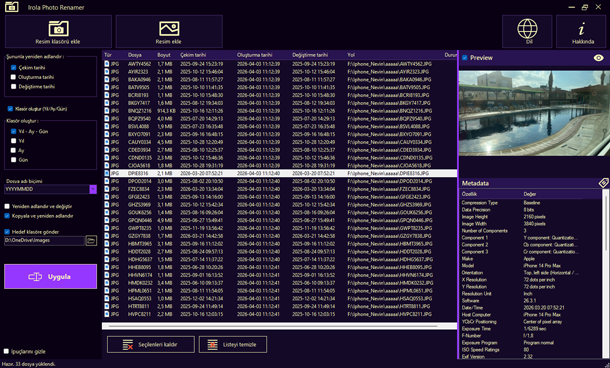
Manage Your Photos Intelligently — For Free
A powerful free tool designed for modern photographers
Between smartphones, mirrorless cameras, DSLRs, and drones, photo libraries quickly become massive. Finding, organizing, and properly renaming thousands of images can turn into a real challenge.
PhotoRenamer completely simplifies this process.
The application automatically analyzes your photos’ metadata to generate clean, consistent, and perfectly organized filenames. Whether you are a professional photographer, content creator, traveler, or photography enthusiast, PhotoRenamer helps you maintain a structured and searchable photo library — without subscriptions, hidden costs, or limitations.
Why Choose PhotoRenamer?
Completely Free
All features are available without subscriptions or premium plans.
Save Massive Amounts of Time
Automate tasks that would otherwise take hours manually.
Keep Your Photo Library Clean and Organized
Find your photos instantly with a consistent folder structure.
Professional Format Compatibility
Full support for RAW formats and advanced metadata.
Native Desktop Performance
Fast, lightweight, and responsive Windows application.
Features
Completely Free
PhotoRenamer is fully free to use.
No subscriptions.
No locked features.
No cloud dependency.
No account required.
Simply download the application and start organizing your photos immediately.
Support for Modern Photo Formats
- JPEG / JPG
- PNG
- TIFF
- HEIC / HEIF
- WebP
- Canon CR2 / CR3
- Nikon NEF
- Sony ARW
- Adobe DNG
- and many more
Thanks to its advanced image processing engine, metadata and previews are correctly handled even for professional RAW formats.
Built for Photographers and Power Users
PhotoRenamer is ideal for:
- professional photographers,
- videographers,
- content creators,
- journalists,
- travelers,
- digital archivists,
- users managing large photo collections.
Intelligent EXIF-Based Renaming
PhotoRenamer can automatically use:
- the original capture date,
- file creation date,
- file modification date,
- and various photo metadata,
to generate accurate and consistent filenames.
Example: 2026-05-01_18-42-15-02.jpg
Ultra-Fast Batch Processing
Import hundreds or even thousands of photos simultaneously.
PhotoRenamer is optimized for:
- large-scale file processing,
- asynchronous operations,
- fast previews,
- smooth handling of large photo libraries.
The application remains responsive even during intensive operations.
Multilingual
French, English, German, Spanish, Italian, Turkish – the UI automatically matches your system language.
Automatic Folder Organization
Automatically organize your images into a clean folder hierarchy:
2026/
└── 05/
└── 21/
PhotoRenamer can automatically create the required folders during processing.
Modern and Intuitive Interface
PhotoRenamer features a clean interface built for productivity:
- file preview,
- live filename preview,
- real-time progress tracking,
- drag-and-drop support,
- quick folder selection,
- modern UI controls,
- optimized workflow.
No complicated setup required.
Import your photos, choose your naming pattern, and start processing.
File Safety and Reliability
Your original files remain protected.
PhotoRenamer includes:
- filename conflict detection,
- automatic unique filename generation,
- secure copy and move operations,
- processing error handling.
You always stay in control of your data.